Home Inventory Template: A Comprehensive Guide
A home inventory template is an indispensable tool for homeowners and renters alike. It’s a detailed record of all your personal possessions within your home, including descriptions, purchase dates (if possible), estimated values, and even photos or videos. This document serves as a crucial asset in various scenarios, from insurance claims to estate planning.
Why You Need a Home Inventory Template
The primary benefit of creating a home inventory is for insurance purposes. Imagine a fire, flood, or theft devastating your property. Without a detailed inventory, recalling every item you owned and proving its value to your insurance company becomes a monumental task. A complete inventory significantly simplifies the claims process, enabling faster and more accurate reimbursement. It can help you recall items you may have forgotten about, maximizing your claim and ensuring you receive fair compensation.
Beyond insurance, a home inventory proves beneficial in other situations:
- Estate Planning: When creating a will or trust, a home inventory provides a clear overview of your assets, aiding in equitable distribution among beneficiaries.
- Moving: Use your inventory to track items during a move, ensuring nothing gets lost or damaged in transit.
- Financial Planning: Knowing the total value of your possessions offers a more comprehensive picture of your net worth, assisting in financial planning and budgeting.
- Theft Prevention: Simply having an inventory can deter theft, as thieves know their actions can be easily documented.
Choosing the Right Template
Numerous home inventory templates are available, ranging from simple spreadsheets to comprehensive software programs. The best choice depends on your needs and technical comfort level.
- Spreadsheet Templates (Excel, Google Sheets): These are readily accessible and customizable. You can create your own or download pre-designed templates online. They offer flexibility but require manual data entry and may lack advanced features like image storage.
- Document Templates (Word, Google Docs): Similar to spreadsheets, these are easily customizable and allow for narrative descriptions. However, managing large amounts of data and calculating totals can be cumbersome.
- Home Inventory Software/Apps: These offer the most comprehensive solution, often including features like barcode scanning, cloud storage, image/video attachments, and pre-populated categories. They typically involve a subscription fee but can save significant time and effort. Many offer mobile apps for convenient updating.
Essential Information to Include
Regardless of the template you choose, certain key information should be documented for each item:
- Item Description: Be as specific as possible. Include brand, model number, size, color, and any unique identifying features.
- Quantity: The number of identical items.
- Purchase Date: An approximate date is sufficient if the exact date is unavailable.
- Purchase Price: The original cost of the item.
- Estimated Current Value: This may differ from the purchase price due to depreciation or appreciation. Research comparable items online to determine a fair market value.
- Location: Specify where the item is located within your home (e.g., “Living Room Bookshelf,” “Master Bedroom Closet”).
- Receipt/Warranty Information: Store copies of receipts and warranty documents with your inventory (electronically or physically).
- Photos/Videos: Visual documentation provides undeniable proof of ownership and condition. Capture clear images or videos of each item, focusing on any distinguishing marks or serial numbers.
Organizing Your Inventory
A well-organized inventory is easier to maintain and use. Consider these organizational strategies:
- By Room: Group items according to the room they are located in (e.g., Living Room, Kitchen, Bedroom).
- By Category: Group items based on type (e.g., Electronics, Furniture, Clothing, Jewelry).
- By Value: Organize items by estimated value, making it easier to identify high-value items that may require special insurance coverage.
Maintaining and Updating Your Inventory
A home inventory is not a one-time task. It requires regular updates to reflect new purchases, disposals, and changes in value. Schedule time at least annually to review and update your inventory. Consider these tips:
- Update after Major Purchases: Immediately add new items to your inventory after purchasing them.
- Update after Disposals: Remove or mark as “disposed” any items you sell, donate, or discard.
- Review Values Periodically: Reassess the estimated current value of your possessions, especially those prone to depreciation or appreciation.
- Store Securely: Keep a copy of your inventory in a safe place, such as a fireproof safe, a cloud storage service, or a safety deposit box. Share a copy with a trusted family member or friend.
Leveraging Technology
Modern technology can significantly simplify the home inventory process.
- Mobile Apps: Use a home inventory app on your smartphone or tablet to easily document items as you walk through your home.
- Cloud Storage: Store your inventory and related documents in the cloud for secure access from anywhere.
- Barcode Scanners: Some apps allow you to scan barcodes to quickly populate item information.
- Voice Assistants: Explore voice-activated inventory apps for hands-free documentation.
Creating and maintaining a home inventory may seem daunting, but the peace of mind and financial security it provides are well worth the effort. By choosing the right template, documenting your possessions thoroughly, and updating your inventory regularly, you can protect your assets and simplify your life.
 680×812 home inventory template excel documents from www.template.net
 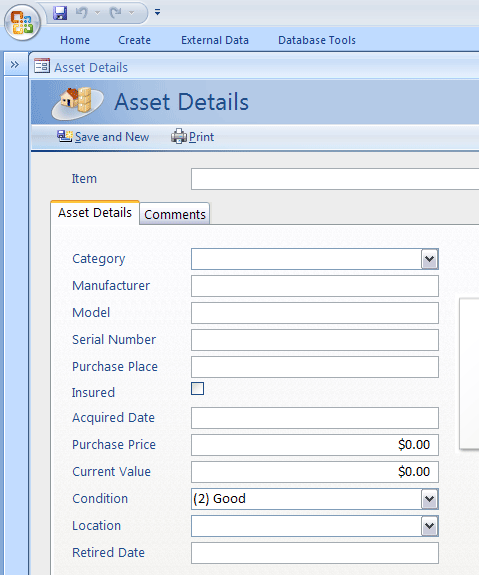 479×575 sample home inventory template ms access templates from access.microsofttemplates.org
  1152×864 home inventory excel templates from exceltemplate.net
  600×730 excel inventory templates excel documents from www.template.net
  585×585 home inventory templates sample format from www.template.net
  950×604 home inventory template fill sign from www.templateroller.com
  1275×481 home inventory template exceltemplatesorg from www.exceltemplates.org
  1024×791 home inventory list template from wordtemplate.net
  636×490 home inventory template word templates from www.wordstemplates.org
  580×420 home inventory templates printable excel word formats from www.sampleformats.org
  680×810 home inventory list templates word excel formats from www.sampleformats.org


Tidak ada komentar:
Posting Komentar