Understanding and Utilizing a Project Plan Template
A project plan template is a pre-structured document that serves as a blueprint for managing a project from initiation to completion. It provides a framework for defining project scope, outlining tasks, allocating resources, establishing timelines, and mitigating risks. Think of it as a roadmap, guiding your team towards a successful outcome.
Why Use a Project Plan Template?
While creating a project plan from scratch is possible, using a template offers numerous advantages:
- Efficiency: Templates save significant time and effort by providing a pre-designed structure, eliminating the need to start from a blank page.
- Consistency: They ensure that all projects follow a standardized format, making it easier to compare performance and track progress across different initiatives.
- Completeness: Templates prompt you to consider all essential aspects of project management, reducing the risk of overlooking crucial details.
- Clarity: A well-structured template enhances communication and understanding among team members, stakeholders, and clients.
- Reduced Errors: By providing pre-defined sections and prompts, templates minimize the chance of errors and omissions.
Key Components of a Project Plan Template
While specific templates vary, most include the following core components:
1. Project Overview/Executive Summary
This section provides a high-level summary of the project, including its objectives, goals, and expected benefits. It’s often the first thing stakeholders read, so it should be concise and compelling.
2. Project Scope
This clearly defines the boundaries of the project. It specifies what is included in the project and, equally important, what is explicitly excluded. Defining scope prevents scope creep, where the project expands beyond its initial objectives, leading to delays and budget overruns. This section typically includes:
- Deliverables: The tangible outcomes of the project (e.g., a software application, a marketing campaign, a finished building).
- Requirements: The specific features, functionalities, or specifications that the deliverables must meet.
- Acceptance Criteria: The conditions that must be met for the deliverables to be considered complete and acceptable.
3. Project Schedule/Timeline
This outlines the project’s timeline, including start and end dates, key milestones, and dependencies between tasks. Tools like Gantt charts or Kanban boards are often used to visualize the schedule. It should identify critical path tasks, which, if delayed, will impact the overall project completion date.
4. Resource Allocation
This section details the resources required for the project, including personnel, equipment, materials, and budget. It specifies who is responsible for each task and how resources will be allocated to different activities. Resource planning is crucial to ensure that the project has the necessary resources at the right time.
5. Risk Management Plan
This identifies potential risks that could impact the project’s success and outlines strategies to mitigate those risks. This includes:
- Risk Identification: Identifying potential threats to the project.
- Risk Assessment: Evaluating the likelihood and impact of each risk.
- Risk Response Planning: Developing strategies to avoid, mitigate, transfer, or accept each risk.
- Risk Monitoring and Control: Continuously monitoring risks and implementing response plans as needed.
6. Communication Plan
This defines how project information will be communicated to stakeholders. It specifies the frequency, method, and responsible parties for different types of communication (e.g., progress reports, status meetings, issue escalations). Effective communication is vital for keeping stakeholders informed and engaged throughout the project.
7. Budget and Cost Management
This outlines the project’s budget and tracks expenses. It includes a detailed breakdown of costs, as well as procedures for managing budget overruns and cost savings. Regular monitoring of budget performance is essential for staying on track.
8. Project Team and Roles
This identifies the project team members and their roles and responsibilities. It also outlines the project’s organizational structure and reporting lines. A clear understanding of roles and responsibilities ensures that everyone knows what is expected of them.
9. Change Management Plan
This outlines the process for managing changes to the project scope, schedule, or budget. It specifies how change requests will be submitted, evaluated, and approved. A formal change management process is essential for controlling scope creep and maintaining project stability.
Choosing the Right Template
Numerous project plan templates are available online, each tailored to different industries and project types. Consider the following factors when selecting a template:
- Project Type: Is it a software development project, a construction project, a marketing campaign, or something else? Choose a template designed for your specific project type.
- Project Size: Is it a small, medium, or large project? Select a template that is appropriately scaled to the size and complexity of your project.
- Industry Standards: Are there any industry-specific standards or regulations that your project must adhere to? Choose a template that incorporates these standards.
- Your Team’s Familiarity: Select a template that your team is comfortable using and that aligns with your organization’s project management methodologies.
Customizing the Template
A project plan template is a starting point, not a rigid constraint. Customize it to fit the unique needs of your project. Add or remove sections as needed, and tailor the content to reflect your specific goals, objectives, and constraints.
By understanding the key components of a project plan template and choosing the right template for your project, you can significantly improve your chances of success. Remember to customize the template to fit your specific needs and to regularly review and update the plan as the project progresses.
 1214×868 easy project plan template sampletemplatess sampletemplatess from www.sampletemplatess.com
  1932×2500 professional project plan templates excel word templatelab from templatelab.com
  1768×2500 professional project plan templates excel word template lab from templatelab.com
  1056×816 project plan templates examples from venngage.com
  474×593 simple project plan template project management small business guide from www.excel-pmt.com
 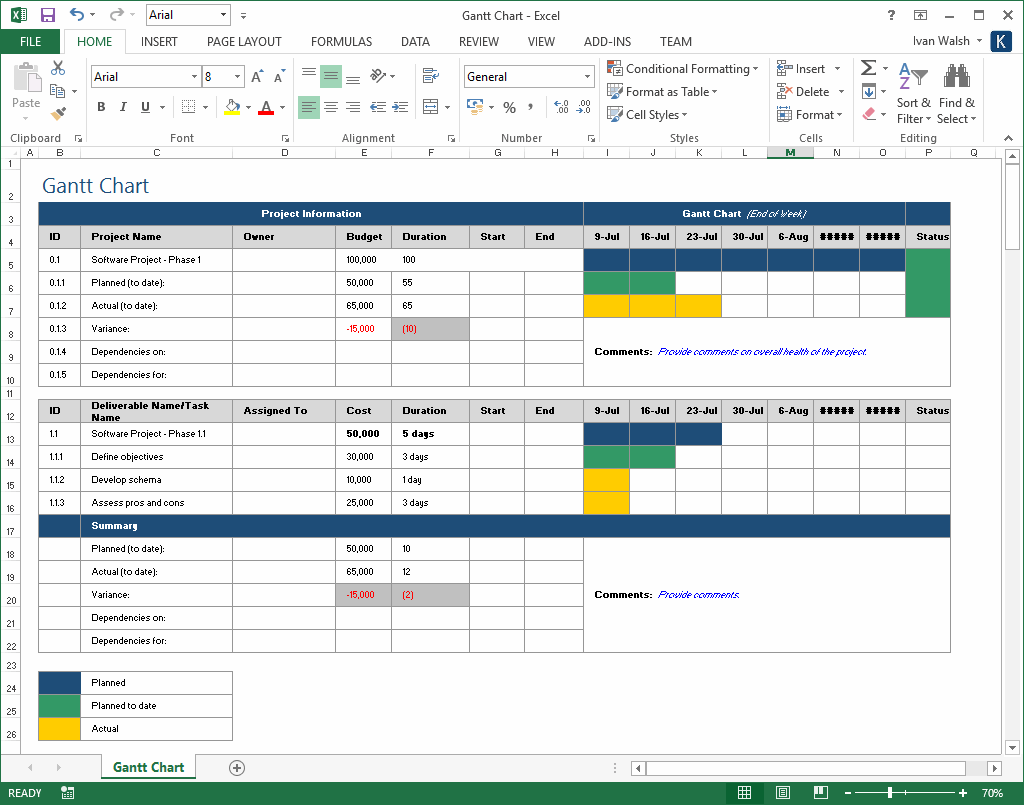 1024×805 project plan templates ms word excels spreadsheets templates from klariti.com
  1728×1350 excel dashboard templates excel templates from www.exceltemplate123.us
  1322×543 simple project plan template excel project management templates from www.techno-pm.com
  2201×1484 design deliverables checklist template images design checklist from www.newdesignfile.com


Tidak ada komentar:
Posting Komentar