
GPA Calculator Template: Your Path to Academic Success
Tracking your Grade Point Average (GPA) is essential for staying on top of your academic performance, whether you're in high school, college, or pursuing postgraduate studies. A well-designed GPA calculator template can be a powerful tool to help you monitor your progress, set goals, and plan your course load effectively. This guide explores the key features, benefits, and implementation strategies for creating and utilizing a GPA calculator template.
Why Use a GPA Calculator Template?
- Organization and Clarity: A template provides a structured way to organize your grades, credit hours, and course information in one place. This eliminates the need for scattered notes or mental calculations, providing a clear overview of your academic standing.
- Accurate Calculation: GPA calculations can be complex, especially when dealing with different grading scales and credit weightings. A template automates these calculations, ensuring accuracy and reducing the risk of errors.
- Progress Monitoring: Regularly updating your template allows you to track your GPA over time, identify areas for improvement, and see the impact of your academic efforts.
- Goal Setting: By projecting your future grades and their impact on your GPA, you can set realistic goals and make informed decisions about your course selection and study habits.
- Time Saving: The automated calculations and organized format of a template significantly reduce the time and effort required to assess your academic performance.
- Motivation: Visually seeing your progress can be highly motivating and encourage you to maintain or improve your GPA.
Essential Features of a GPA Calculator Template
A comprehensive GPA calculator template should include the following features:
- Course Information: Columns for entering the course name, course code, credit hours (or units), and letter grade received.
- Grade Points: A table or formula to automatically convert letter grades into corresponding grade points (e.g., A = 4.0, B = 3.0, C = 2.0, D = 1.0, F = 0.0). The grade point scale may vary depending on your institution. Consider including options for plus/minus grades (e.g., A+ = 4.3, B- = 2.7).
- Quality Points: A formula to calculate quality points for each course by multiplying the grade points by the credit hours (e.g., Grade Points * Credit Hours = Quality Points).
- Semester/Term GPA: Formulas to calculate the GPA for each semester or term by summing the quality points and dividing by the total credit hours for that term (e.g., Total Quality Points / Total Credit Hours = Semester GPA).
- Cumulative GPA: A formula to calculate the overall GPA by summing the total quality points from all semesters and dividing by the total credit hours from all semesters.
- Credit Hour Tracking: A section to keep track of the total credit hours completed.
- Weighted GPA (Optional): Some institutions use weighted GPAs for honors courses or advanced placement classes. If applicable, include a column to indicate if a course is weighted and adjust the grade points accordingly.
- Clear Formatting: Use clear and consistent formatting, including headings, labels, and appropriate font sizes, to make the template easy to read and understand. Consider using color-coding to visually separate different sections.
Creating Your GPA Calculator Template
You can create a GPA calculator template using spreadsheet software like Microsoft Excel, Google Sheets, or Apple Numbers. Here's a step-by-step guide:
- Set Up Column Headers: Create column headers for Course Name, Course Code, Credit Hours, Letter Grade, Grade Points, and Quality Points.
- Enter Grading Scale: Create a separate table or area to define the grading scale (e.g., A = 4.0, B = 3.0, etc.). You can use the `VLOOKUP` function in Excel or Google Sheets to automatically convert letter grades into grade points.
- Calculate Grade Points: Use a formula (e.g., `VLOOKUP(Letter Grade, Grading Scale, 2, FALSE)`) to automatically look up the grade point equivalent for each letter grade entered.
- Calculate Quality Points: Create a formula to multiply the Grade Points by the Credit Hours (e.g., `Grade Points * Credit Hours`).
- Calculate Semester/Term GPA: At the bottom of each semester or term section, use the `SUM` function to calculate the total quality points and total credit hours. Then, divide the total quality points by the total credit hours to calculate the GPA.
- Calculate Cumulative GPA: Use the `SUM` function to calculate the total quality points and total credit hours from all semesters. Then, divide the total quality points by the total credit hours to calculate the cumulative GPA.
- Format the Template: Use formatting options to make the template visually appealing and easy to understand. Add borders, colors, and font styles to enhance readability.
Tips for Effective Use
- Regularly Update: Update your template as soon as you receive your grades for each course.
- Accuracy is Key: Double-check all entries to ensure accuracy, especially credit hours and letter grades.
- Explore "What-If" Scenarios: Use the template to explore different grade scenarios and see how they would impact your GPA.
- Back Up Your Template: Regularly back up your template to prevent data loss.
- Customize as Needed: Adapt the template to meet your specific needs and the grading policies of your institution.
A well-designed GPA calculator template is more than just a spreadsheet; it's a valuable tool for academic success. By using a template effectively, you can stay organized, track your progress, set goals, and ultimately achieve your academic aspirations.
 1152×864 gpa calculator excel templates from exceltemplate.net
 1365×700 gpa calculator excel template college gpa calculator excel from www.someka.net
1364×700 excel gpa calculator template weighted grade calculation spreadsheet from www.someka.net
 1024×817 high school gpa calculator template excel templates from www.excelstemplates.com
 1083×1402 gpa calculator excel template sampletemplatess sampletemplatess from www.sampletemplatess.com
 637×958 gpa calculator excel template excel templates from www.exceltemplate123.us
 818×531 gpa calculator excel template from lesboucans.com
 530×749 fillable gpa calculation printable from www.formsbank.com
 1152×864 gpa calculator excel templates from exceltemplate.net
 1365×700 gpa calculator excel template college gpa calculator excel from www.someka.net
 1364×700 excel gpa calculator template weighted grade calculation spreadsheet from www.someka.net
 1024×817 high school gpa calculator template excel templates from www.excelstemplates.com
 1083×1402 gpa calculator excel template sampletemplatess sampletemplatess from www.sampletemplatess.com
 637×958 gpa calculator excel template excel templates from www.exceltemplate123.us
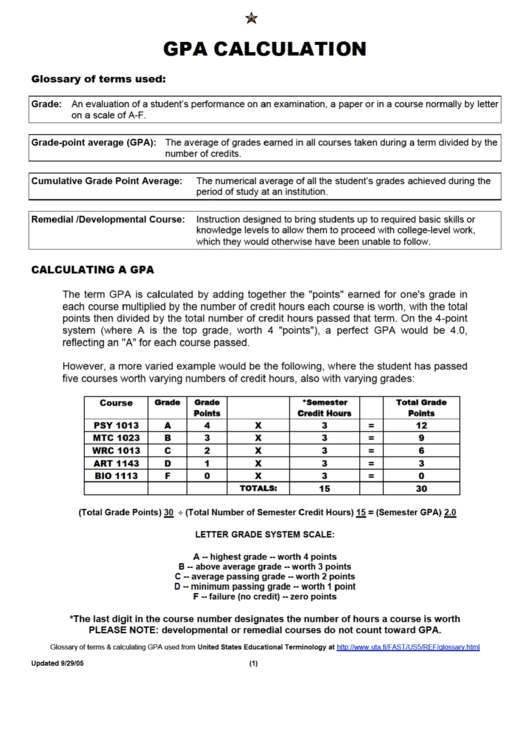 530×749 fillable gpa calculation printable from www.formsbank.com


Tidak ada komentar:
Posting Komentar